A moodboard used to mean an afternoon of searching, saving and arranging. An AI moodboard generator turns a sentence into a finished board. Here is what it actually does, what to type in, and where it still needs your eye.
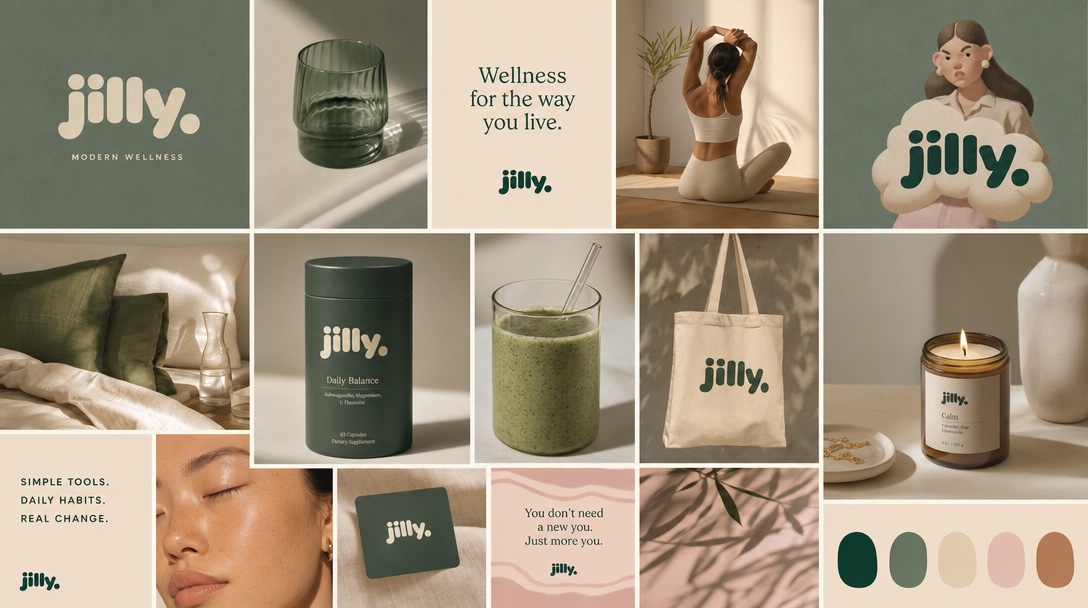
Yes, AI can create a moodboard. You describe your brand or project in a sentence or two, and an AI moodboard generator returns a complete board: colors, type, photography style and sample images that all share one look. The strongest results come from describing the feeling and the audience, adding your own images if you have them, and refining with short edits instead of starting over.
A moodboard is a single page that shows what something should feel like: the colors, the type, the kind of photography, the textures. Its job is to get everyone agreeing on a look before anyone makes the real thing. (New to the idea? Start with what a mood board is.)
Making one by hand means searching Pinterest or stock sites, saving dozens of images, and trimming them until they hang together. An AI moodboard generator skips the hunting. It reads your description, picks a direction, and generates the images, palette and type to match, so the whole board comes back consistent from the start.
The images are new, made for your board. They aren't other people's photos pulled from the web, which matters once the board turns into real work for a client or a launch.
Pinterest is great once you know what to search for. The catch is that you have to know. If all you have is a feeling, like “calm but not boring” or “premium but friendly”, search only shows you versions of the words you typed.
Generating a moodboard with AI works the other way around. You describe the feeling, and it shows you a direction you might not have thought to search for. Often that's the most useful part: seeing an idea you didn't have, then deciding whether it's right.
In MoodyBoards it works like this:
Once the board is right, you can make on-brand images from it, like product shots, social posts and banners, that all keep the same look. That's covered in how to keep social posts on brand.
Honest limits, so you know where your own eye matters:
Tools differ a lot. Some make a single image, some only arrange photos you upload, some build a full board with type and palette. We compared the main options side by side in the best AI moodboard generators. If you're coming from Canva, see MoodyBoards vs Canva.
Yes. An AI moodboard generator takes a short description of your brand or project and returns a finished board: a color palette, type, photography style and sample images, all in one consistent look. You review it, edit what's off, and use it as your visual direction.
Describe the feeling and the audience, not just the product. Name a few concrete details, like materials, lighting or a place, and add your own images if you have them. Then pick the closest result and refine it with short edits instead of starting over.
They do different jobs. Pinterest is good when you already know what to search for. An AI moodboard generator is better earlier, when you only know the feeling you want, because it shows you directions you wouldn't have thought to type in. Its images are also original, not other people's photos.
In MoodyBoards, yes. You can attach your logo, product shots or other images, or paste your website address to pull images from it, and the board is built around them. You can also take the board's colors from your logo.
For a first direction, it saves most of the time. It doesn't replace taste. You still decide which board is right, and a designer is still worth it for a real logo and identity system.