
Brainstorm to mood board to on-brand campaign imagery — in one afternoon, without filing a design ticket. Built for in-house marketing managers who need a visual direction fast.
If you run marketing in-house, you know the bottleneck isn't ideas — it's getting a visual made. You have a campaign concept in your head, but turning it into something you can show a stakeholder means opening a request in the design queue, writing a brief, and waiting. By the time the mockup comes back, the moment has cooled. MoodyBoards is built to close that gap: describe your brand or campaign in plain language, and it generates a mood board — palette, typography feel, lighting, subject, and mood — then on-brand images that follow that direction.
It's not a design app you have to learn or a template you have to wrestle into shape. You write a few sentences about the brand and the campaign, and you get back a concrete visual direction plus imagery that inherits it. That's enough to align a team, pressure-test an idea, or brief the design team with something real instead of a vague description.
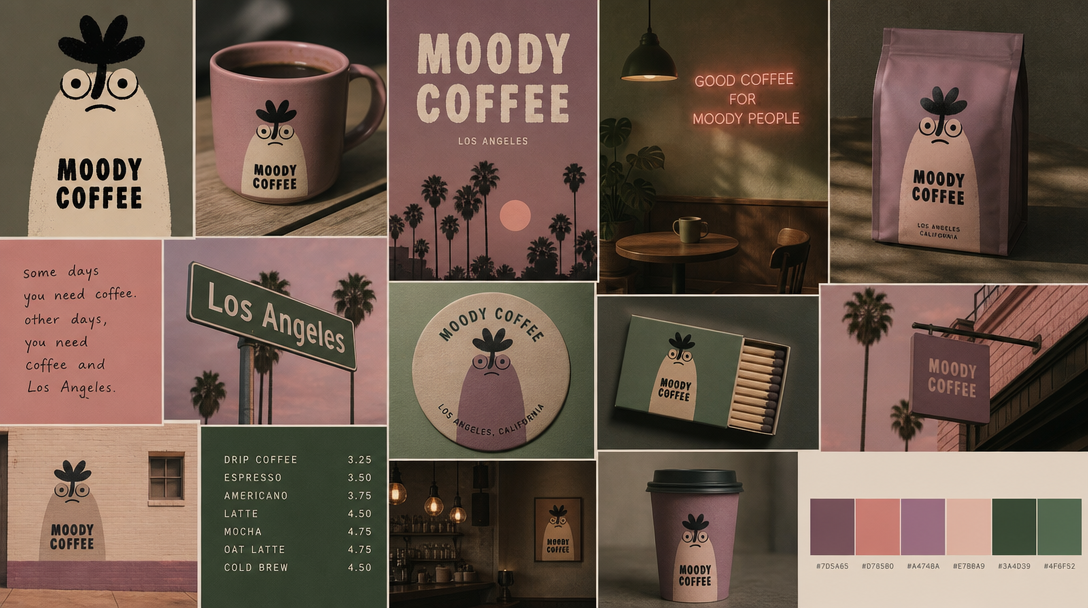
The slowest part of most campaigns isn't the thinking, it's the handoff. You have a direction in mind but no way to show it, so it sits in a queue behind everyone else's requests. MoodyBoards lets you take the first step yourself. You describe the campaign, and it generates a mood board that captures the palette, typography feel, lighting, and mood — a real visual direction you produced without waiting on anyone. You still get the design team's craft later; you just don't need them to see whether the idea holds up.
A single good image isn't the hard part — keeping a whole campaign looking like it belongs together is. MoodyBoards saves your visual direction once, and every image you generate afterward inherits the same palette, typography feel, lighting, and mood. So a set of visuals for a launch, a landing page, and a social push reads as one campaign instead of a grab bag. The output is yours to use commercially, with no attribution required.
"Picture something warm and editorial" doesn't survive a stakeholder meeting. A board does. Because MoodyBoards turns a description into an actual mood board plus imagery in one pass, you walk into the review with something people can react to — approve, redirect, or build on — instead of asking them to imagine it. Getting to a shared visual reference early is what keeps a campaign from drifting through three rounds of vague feedback.
There's no ticket to file and no template library to fight. You don't drag elements into a grid or hunt for a layout that almost fits. You write what the brand and campaign are about, and MoodyBoards generates the direction. That's the whole workflow — describe, generate, refine. It gives you a visual direction and on-brand imagery, not a finished ad, so treat it as the fast first mile that gets everyone aligned before the polish happens.
Yes — that's the point. You describe your brand or campaign in plain language, and MoodyBoards generates a mood board (palette, typography feel, lighting, subject, mood), then on-brand images that inherit that direction. You don't need to open a design tool or file a design ticket to get a concrete visual direction you can show stakeholders.
MoodyBoards saves your visual direction once, so every image you generate afterward inherits the same palette, typography feel, lighting, and mood. That saved direction is what keeps a set of campaign visuals looking like they belong together, instead of matching things by hand each time.
MoodyBoards gives you a visual direction plus on-brand imagery — not finished, guaranteed ads. It does not create logos, it does not produce print-ready files, and it does not integrate with ad platforms. It is free to start, with Starter at $9.99/mo and Pro at $19.99/mo, and output is licensed for commercial use with no attribution required.