
For couples and planners who know the feeling: you can picture the day exactly, and you can't find a single photo of it.
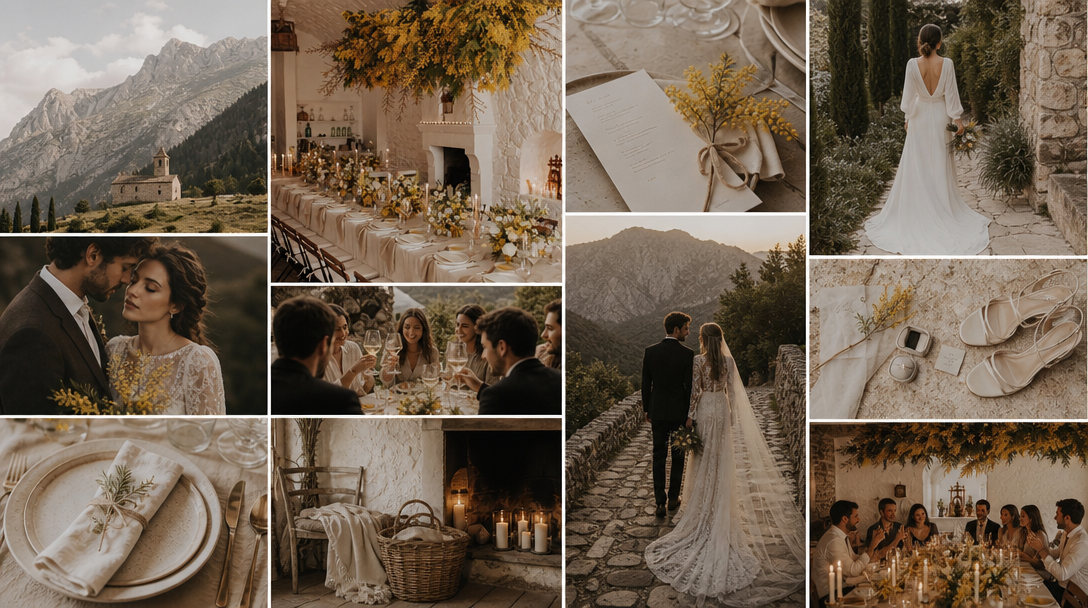
Every wedding mood board starts the same way. You open Pinterest, you type something like "moody autumn greenhouse wedding," and you save forty images. Thirty-five of them are close. None of them are it.
That gap is the whole problem. Pinterest is a search engine for photographs that already exist, and it is genuinely excellent at that. But a wedding is usually a combination — your grandmother's dress, a venue with bad lighting, two family traditions, a color you saw once — and the more specific your idea gets, the less likely it is that anyone has already photographed it.
So the honest way to compare these tools isn't "which makes the prettiest board." It's are you collecting, or are you visualizing? Collecting means gathering what exists. Visualizing means seeing something that doesn't exist yet. Different jobs, different tools.
Wedding briefs get specific fast, and specificity is exactly where a search box gives out. Two kinds of instruction break it:
Proportion. “Blush pink throughout, with a bold red used sparingly” is a judgment about how much, not about what. Search engines index subjects. They do not index restraint.
Negatives. A couple might want a shared cultural heritage present in the design without using that culture’s written characters. That is a perfectly clear instruction to a human designer and an impossible one to type into a search field — you can search for what you want, but not for what you want it left out.
Both are ordinary requests. Neither is searchable. That is the gap a generator fills: you describe the constraint in a sentence and it renders something that respects it, instead of handing you the nearest photograph that ignores it.
You describe the wedding in plain sentences and it generates a board of original images from that description — it isn't searching a photo library, so an unusual combination still renders. "A late-October wedding in a glass greenhouse at dusk, oxblood and dusty rose florals, black taper candles, mismatched antique brass" returns that, rather than the nearest barn wedding someone happened to shoot. You can upload reference images to steer it, and edit individual images afterward by describing the change.
Best for: A specific vision you can't find on Pinterest. Sending a florist or planner a clear picture of the direction instead of a paragraph.
Watch out: These are references, not real vendors, venues or products. You can't book what's in the image — you use it to explain what you want to someone who can source it.
Pricing: First board free, no card required. Starter $9.99/mo, Pro $19.99/mo.
Still the default, still free, and still the best place to find out what you actually like before you can name it. Boards are easy to share with vendors, and most wedding professionals are fluent in reading a Pinterest board. The limitation is structural: it can only ever return photographs that exist, so the more particular your idea, the more it hands you approximations.
Best for: The first month of planning. Figuring out your taste by reacting to things.
Watch out: Boards sprawl. Fifty pins isn't a direction, it's a pile — at some point you have to cut it down to the ten that agree with each other.
Pricing: Free.
A freeform board where images, color swatches, notes, to-dos and vendor details live side by side, then get shared with a client for comment. For a planner running several weddings, this is the closest thing to a working document that still looks presentable when a couple opens it.
Best for: Wedding planners and anyone coordinating multiple vendors.
Watch out: The free plan is capped at 100 cards and 10 file uploads — one full wedding will usually blow past that. Paid runs roughly $9.99/mo billed annually, or about $12.50/mo billed monthly.
Templates, drag-and-drop, and a very short path from "I have twelve images" to "I have a clean one-page PDF." If the board's job is to be printed, emailed to a venue, or dropped into a planning deck, Canva is the least fussy way to get there. You're arranging assets you already have rather than making new ones.
Best for: Turning a pile of saved images into one tidy page a vendor can actually read.
Watch out: Template gravity is real — it's easy to end up with a board that looks like the template rather than like your wedding.
Pricing: Free tier available. Pro from around $13/mo.
The inspiration board sits inside the full planning suite, alongside your guest list, budget, vendor search and wedding website. Of the two big planning platforms it has the more developed board, and it comes with the advantage that the vendors you're browsing are already in the same place.
Best for: Couples already running their planning through The Knot.
Watch out: The board is a feature of a planning suite, not a design tool. Don't expect much control over how it looks.
Pricing: Free with an account.
Same idea as The Knot — a vision board bundled with registry, website and planning tools — in a lighter, simpler form. If you're already using Zola for the registry, there's little reason to add another tool just to hold images.
Best for: Couples already on Zola for registry and website.
Watch out: Basic compared to The Knot's board, and much more basic than a dedicated design tool.
Pricing: Free with an account.
Not a design tool, but a lot of couples already live here, and a gallery of images sitting directly above the budget table and the vendor tracker has an obvious appeal. Plenty of free wedding templates exist. The board will look like a database, because it is one.
Best for: Spreadsheet-brained couples who want everything in one workspace.
Watch out: Fine for organizing, weak for anything you'd hand a florist.
Pricing: Free for personal use.
Use two tools, not one. Almost every couple needs a collector and a visualizer, and they're rarely the same product.
Start on Pinterest to work out what you like. It's free, it's fast, and you can't skip the part where you react to a hundred images and slowly notice a pattern.
Then, once you have an idea Pinterest can't show you — and if your wedding is at all specific, you will — use MoodyBoards to actually see it. Describe the day in sentences and get original images of that combination, rather than the closest thing someone else already photographed.
If you're a planner, run the whole thing in Milanote and generate the visuals elsewhere. If the board's final job is to be printed and handed to a vendor, finish it in Canva.
Try MoodyBoards freeA wedding mood board is a single visual page that fixes the look of your wedding: colors, florals, textures, lighting, table settings and attire, all in one frame. It's what you send a florist, planner or photographer so everyone is building toward the same day instead of guessing from a description.
Pinterest is the best free way to collect wedding ideas that already exist, and most couples should start there. Its limit is that it can only return photographs someone has already taken. If your idea is a specific combination that nobody has shot, Pinterest returns the closest approximation instead of the thing you actually pictured.
Milanote suits planners best, because visuals, vendor notes, budgets and to-dos live on the same board and it can be shared with a client for feedback. Its free plan is capped at 100 cards and 10 file uploads, which a single full wedding will usually exceed.
Yes. Tools like MoodyBoards generate original images from a written description rather than searching existing photos, which means an unusual combination — a foggy coastal wedding mixing two family traditions, say — can be rendered even though no photograph of it exists. The tradeoff is that generated images are references for a direction, not real vendors, venues or products you can book.